


Moving to a new country—or simply travelling for a few weeks—changes how you use your phone. Banking, transport, food delivery, maps and workplace tools may all depend on local apps. On a Huawei device, the easiest approach is not to search for one universal workaround, but to use the right source for each service.
Begin with AppGallery
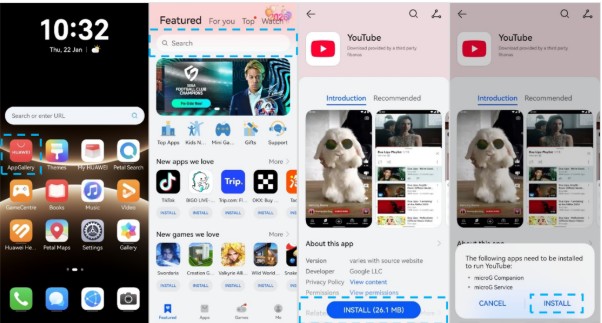
Open HUAWEI AppGallery and search for the app by its official name. Before downloading, check that your HUAWEI ID region matches the country where you are staying. Regional settings can affect which banking, retail and mobility apps appear.
For Google-based services, the official Huawei Community guide explains how supported devices can locate Google apps through AppGallery, sign in to an account and use GBox when an app is not listed directly. The full steps are available in this huawei google play store guide.
Find Local Apps Safely
If a local app is missing from AppGallery, visit the service provider’s official website. Many airlines, banks, public transport operators and retailers provide an official APK or a mobile web app. A web version can often be added to the home screen for faster access.
Avoid unknown download sites, especially for apps that handle payments, identity documents or personal messages. Check the developer name, requested permissions and download domain before installing anything.
Set Up Google-Dependent Apps
The phrase huawei google play store often refers to accessing apps that rely on Google services rather than installing a conventional Play Store package. Where supported, GBox can provide a compatible environment for these apps. Availability and performance may vary by phone model, software version, region and app.
After installation, test sign-in, notifications, maps, camera access and in-app payments. These functions matter more than whether the icon simply opens.
Improve Everyday Reliability
Allow essential apps to send notifications and run in the background. Location access may be required for ride-hailing, navigation and delivery services. Keep EMUI, AppGallery and GBox updated, and restart the phone after major updates if an app behaves unexpectedly.
When an app still fails, clear its cache, confirm the account region and reinstall it from the original source. Some local services may also require a domestic SIM card, phone number or payment method.
A Practical App Strategy
Using a Huawei phone abroad is easier when you follow a clear order: AppGallery first, the developer’s official site second, a trusted web app third, and a compatibility solution only when required. For the official setup sequence and current guidance, review the huawei google play store instructions before installing Google-dependent apps.
